Every feature, module by module
- Modules
- 5
- From
- $12 USD/mo
- Trial
- 14 days, no card
- Units
- mm, cm and inches
Cutting optimizer
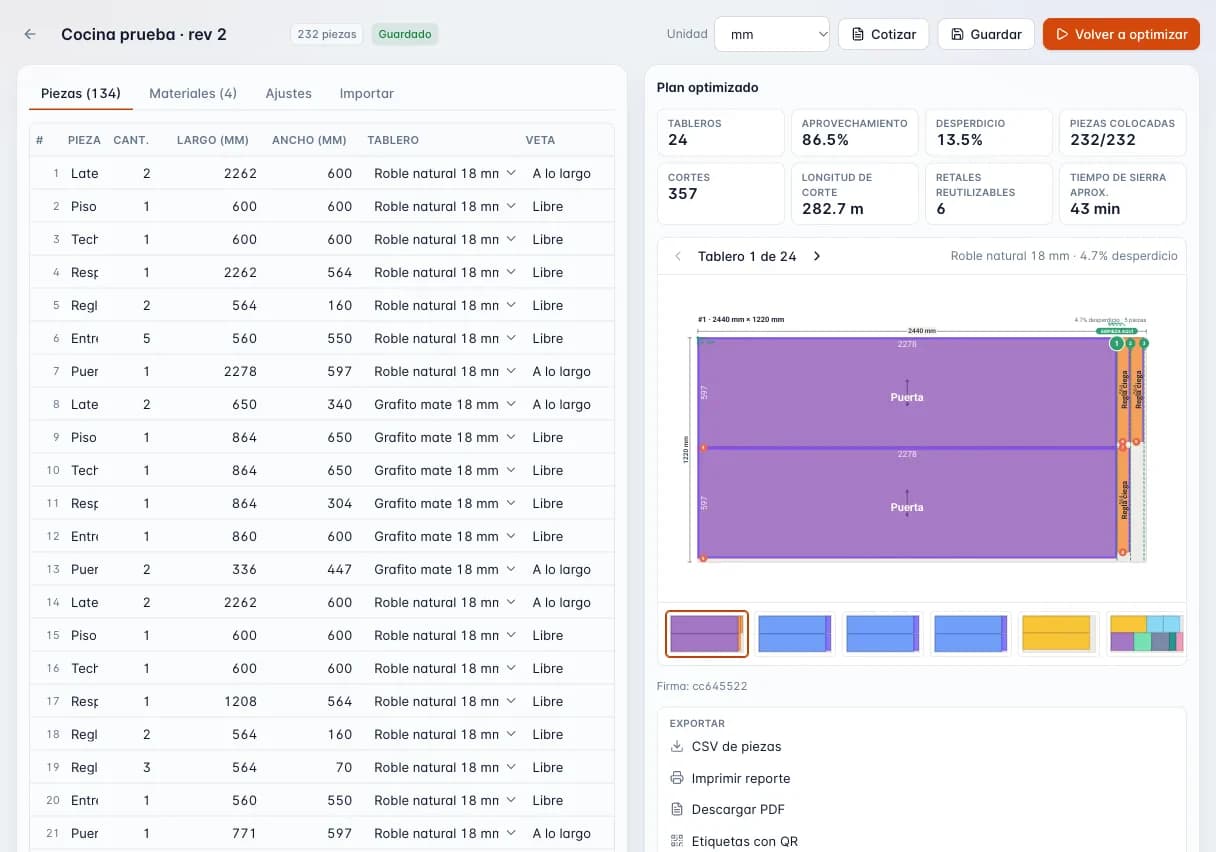
Type or paste your cut list once and get a layout for every sheet, with grain, kerf and edge trim handled, offcuts tracked and QR part labels ready for the shop.
- Guillotine or nesting
- Choose guillotine cuts for a panel saw or table saw, limited to 2 or 3 stages, or free-form nesting for a CNC router.
- Optimization goals
- Optimize for least waste, fewest cuts, fewest sheets, best offcuts, lowest cost or fewest distinct patterns, and set how hard the solver works.
- Grain by part and by material
- Set grain along the length, across the width or none for each material and each part, and choose which parts may rotate. Doors and fronts keep the grain running the right way.
- Kerf and edge trim per material
- Enter the blade kerf and the edge trim for each sheet type, and override them for a single job when needed.
- Mixed materials in one job
- Up to 100 materials and thicknesses per job: 3/4 in melamine, MDF, plywood and 1/4 in backs in one run.
- Offcuts that get used
- Usable offcuts are saved with their size and the optimizer reaches for them before opening a new sheet. Mark them used once they are cut (paid plans).
- Edge banding per side
- Mark banding on the top, bottom, left and right of each part. Band thickness is deducted from the cut size, and banding footage flows to quoting and inventory.
- QR part labels
- One label per part with name, size, material, thickness, job, sheet number, cabinet and banding marks per side, printed from the browser (paid plans).
- CNC files
- Export DXF, G-code (.nc), Homag MPR and Biesse CIX for your router or machining center (paid plans).
- PDF report, CSV and sheet size finder
- A printable report and PDF (watermarked on Free), CSV export, and a finder that compares sheet sizes before you buy (paid plans).
Cabinet design
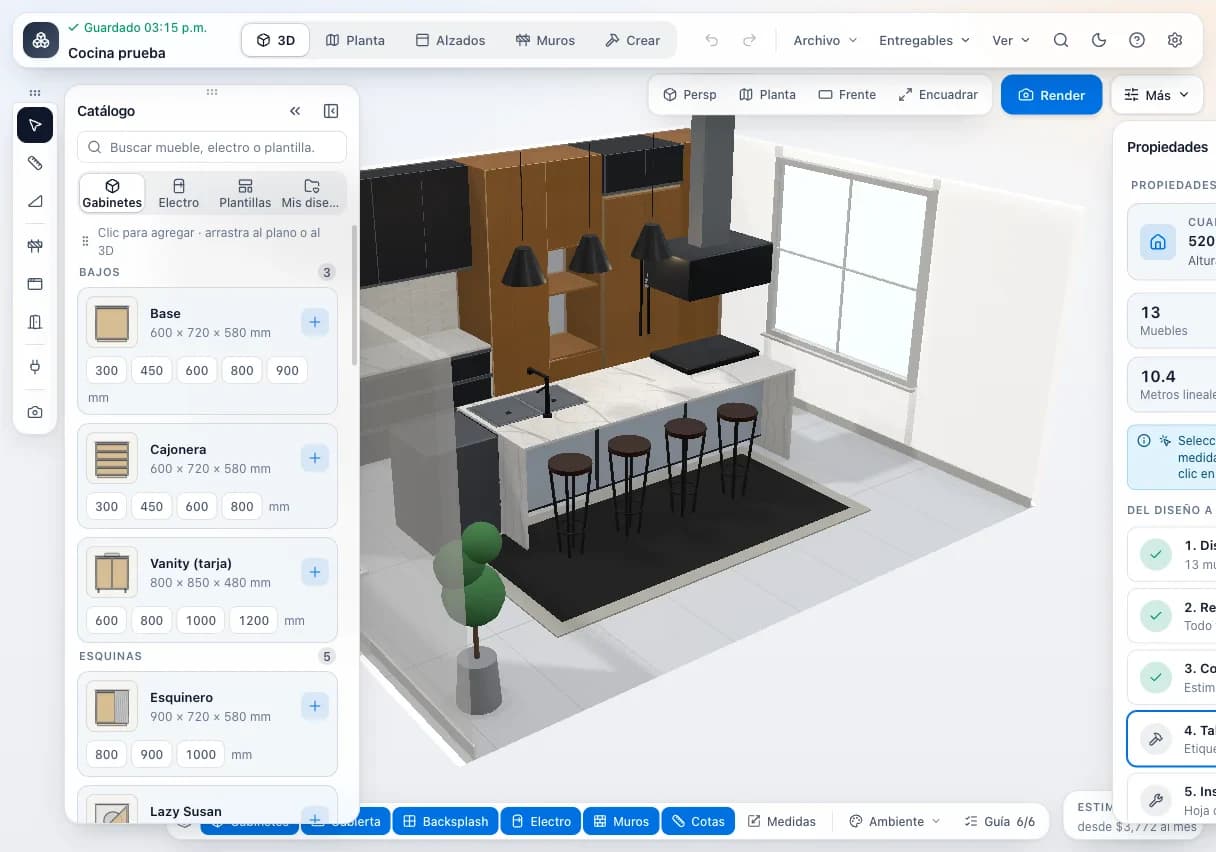
Lay out the job box by box, walk your client through it in 3D, and get the cut list, hardware and shop drawings on the spot, ready to cut and quote.
- Kitchens, closets and vanities
- Design kitchens, reach-in and walk-in closets and bathroom vanities in one editor, cabinet by cabinet, with editable dimensions.
- About 19 cabinet types
- Base, wall, drawer base, corner, tall, open, pantry, vanity, filler, closet unit, lazy Susan, pull-outs, lift-up, oven tower, magic corner and more.
- Automatic closet layouts
- The generator builds a closet run with its units automatically, which you then fine-tune.
- 3D and photorealistic renders
- Spin the job in 3D with your client and produce a path-traced photorealistic render to close the sale before you cut.
- Floor plan, elevations and shop drawings
- A floor plan, wall elevations, and technical and assembly drawings for every cabinet, so the shop isn't guessing.
- Automatic cut list
- Every cabinet generates its parts with size, material and banding, with edge banding grouped by color.
- Hardware and shopping list
- A Blum hardware list, a shopping list, edge banding by color and a countertop quote.
- Exports
- Cut list to Excel (.xlsx) and CSV; CSV for hardware, cabinets, packing list, drilling plan and production order; DXF for the drilling plan and floor plan.
- Print from the browser
- Client proposal, part labels and cut sheet, printed straight from the browser.
- Materials catalog and shop settings
- A company catalog of sheet goods, edge banding, hardware and suppliers, with CSV import. Shop settings are shared across your team.
Quoting
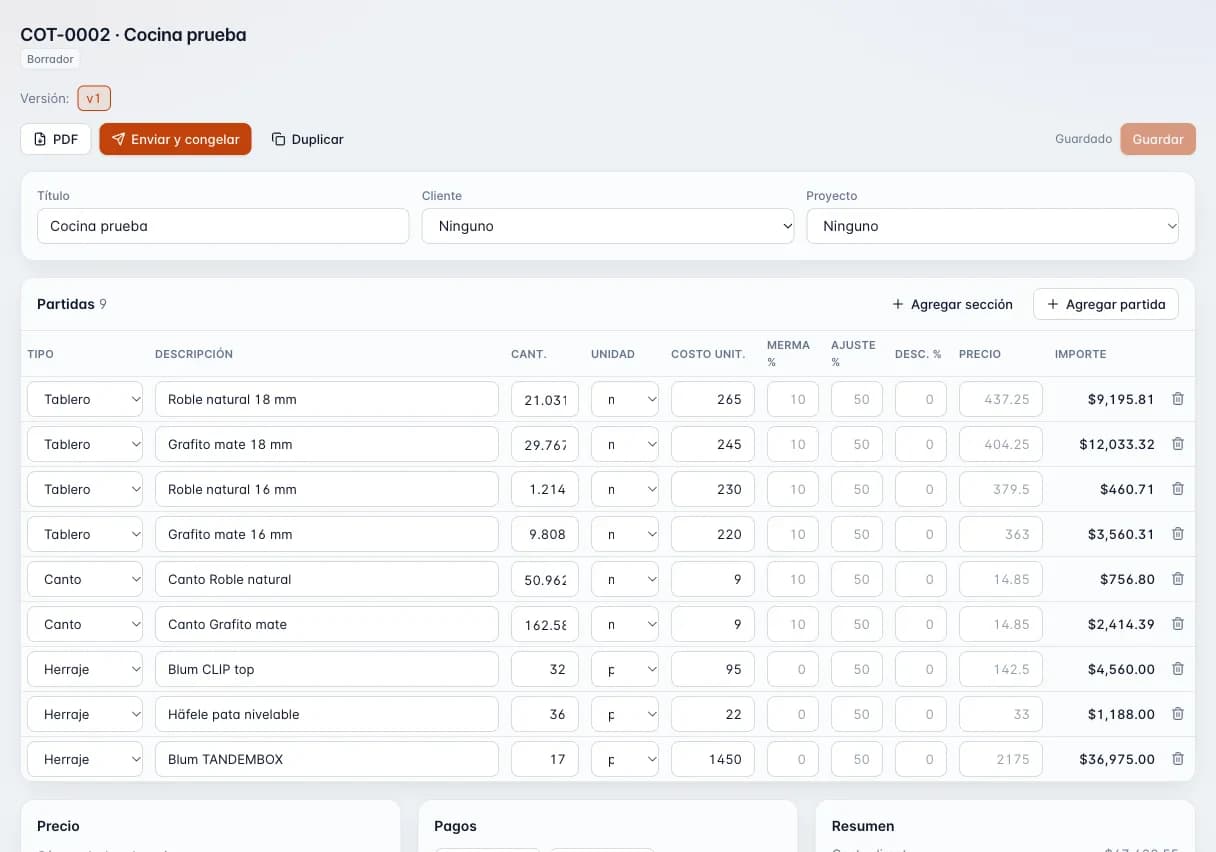
Build quotes from the real cost of sheet goods, edge banding, hardware, labor and installation, pick markup or margin, and send a branded PDF plus a link where your client accepts or declines.
- Line items by type
- Material, edge banding, hardware, labor, installation, delivery and other. Every line carries your cost and your price.
- Markup or margin
- Price with markup on cost or margin on selling price. Margin is capped at 99% so the math never breaks.
- Overhead, waste and discounts
- Add an overhead and waste percentage, and discount a single section or the whole quote.
- Deposit and payment milestones
- Set the deposit and later payments, such as one due at install, so the client knows what is due and when.
- Configurable taxes
- Keep a list of sales tax or VAT rates and apply the ones that fit each job.
- Multiple currencies
- Quote in US or Canadian dollars, euros, Mexican pesos and several Latin American currencies.
- Versions and statuses
- Sending a quote freezes it as a version. New version or duplicate when the client wants changes. Statuses: draft, sent, accepted, declined, expired and converted.
- Client approval link
- Every quote gets a public link where your client reviews it and accepts or declines. You share it however you like.
- Branded PDF and numbering
- A PDF with your logo and brand color, numbered in sequence (COT-0001) so nothing gets lost.
- Customers and projects
- Each quote is tied to a customer and a project, so you can find it fast.
Production
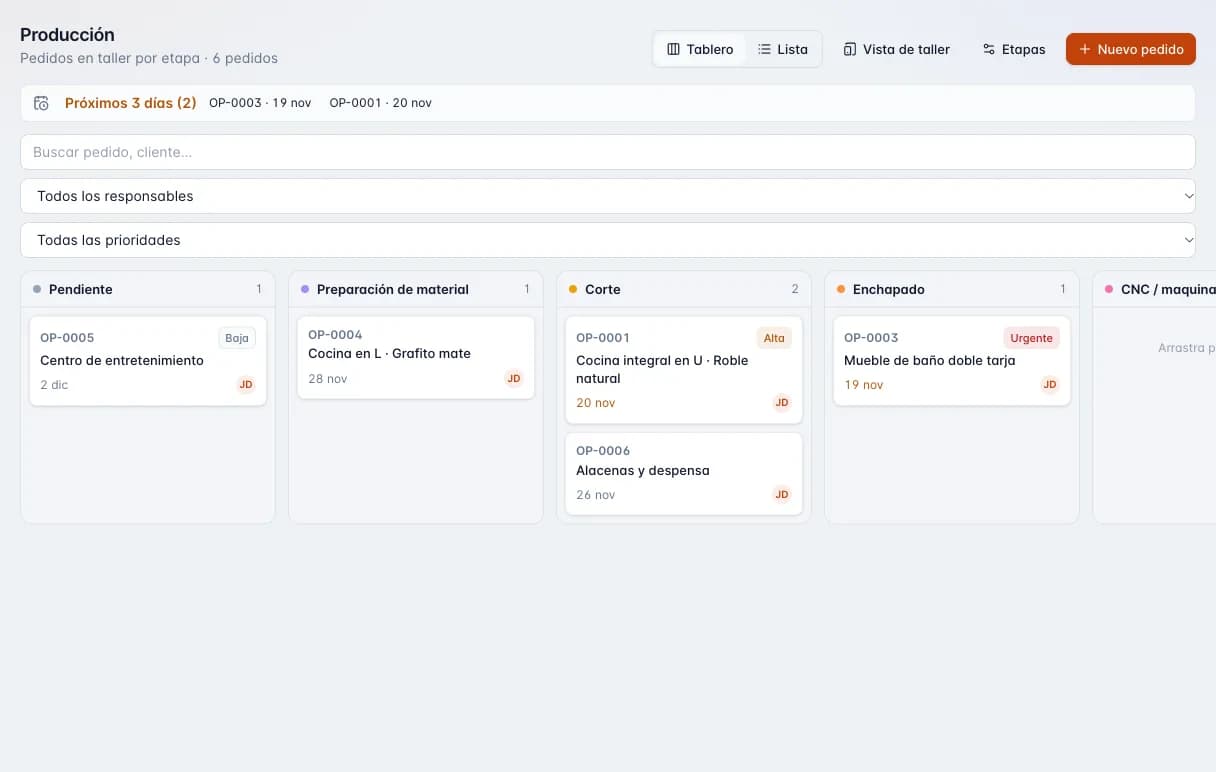
A board built around your shop's stages, from the saw to installation. Every job shows where it is, what is running late and what ships this week.
- 10 stages out of the box
- Pending, material prep, cutting, edge banding, CNC machining, assembly, finishing, quality check, ready to install, and installed or delivered.
- Stages that fit your shop
- Adjust the stages so the board matches how your shop really runs.
- Kanban board
- Drag each job to its next stage, with a mouse or a finger on a tablet or phone.
- Shop-floor view
- Big touch targets to move a job or add a note right from the floor, no menus to fight.
- Workshop role
- Users with the workshop role land straight on the shop-floor view, ready to work.
- Overdue and due-soon flags
- Jobs past due and jobs due within 3 days are flagged so nothing slips.
- Priority
- Mark which jobs go first when the shop is slammed.
- Notes and timeline
- Each job keeps its notes and a timeline of every stage change.
- File attachments
- Attach drawings, photos or the cut-list PDF to the job, up to 15 MB per file.
- See-money permission
- Decide who sees costs and prices. The shop can build the job without seeing what you charged.
Inventory
Log every receipt, issue and adjustment for sheet goods, edge banding and hardware. Reserve material for each job and let it come off the books when the job is done.
- In, out and adjust ledger
- Every movement is logged with its date, so you can see why a count changed.
- Sheets, edge banding and hardware
- Melamine and MDF sheets, edge banding rolls, hinges, slides and other hardware in one place.
- Job reservations
- Reserve material for a specific job so it does not walk off to another one.
- Reserve from the quote
- Materials on a quote can be reserved directly, with no retyping.
- Automatic consumption
- When the job reaches a done stage in Production, its reserved material is deducted on its own.
- Reorder point
- Set a minimum per item and it gets flagged on screen when stock drops below it.
- See-money permission
- Crew without the see-money permission can log movements without seeing costs.
Across the platform
What every module shares, whatever the plan.
- In the browser
- Computer, tablet or phone, on Windows, Mac, Android or iPhone. Nothing to install. Needs internet: there is no offline mode.
- English and Spanish
- The whole app is in both languages with real shop vocabulary. The 3D designer is Spanish-only for now.
- Metric and imperial
- The optimizer works in mm, cm, decimal inches or fractional inches.
- Materials catalog
- Sheets, edge banding, hardware and more with suppliers; import by CSV or start from a Mexican starter catalog.
- Customers and projects
- Every design, cut job, quote and production job hangs off a project and a customer.
- Roles and permissions
- Owner, admin, member, viewer and shop floor, with the option to hide costs and prices per person.
- Your logo and color
- On PDF quotes, in the plans that include branding.
- Export your data
- The owner downloads all of the company's data in one file, even with a lapsed subscription.
- Secure sign-in
- Verified email, optional two-factor authentication and data isolated per company.
- Light and dark mode
- For the office and the shop floor.
Which plan includes what?
The full table of features and limits per plan is on the pricing page, generated straight from our plan catalog.
Cut better starting with your next job
Create an account and use the full Workshop plan for 14 days. No card; afterwards you drop to the Free plan, not a lockout.