Woodshop production tracking from cut to install
- Price
- $19 USD/mo
- Users included
- 3
- Included in
- Professional Suite
- Runs in
- Browser, nothing to install
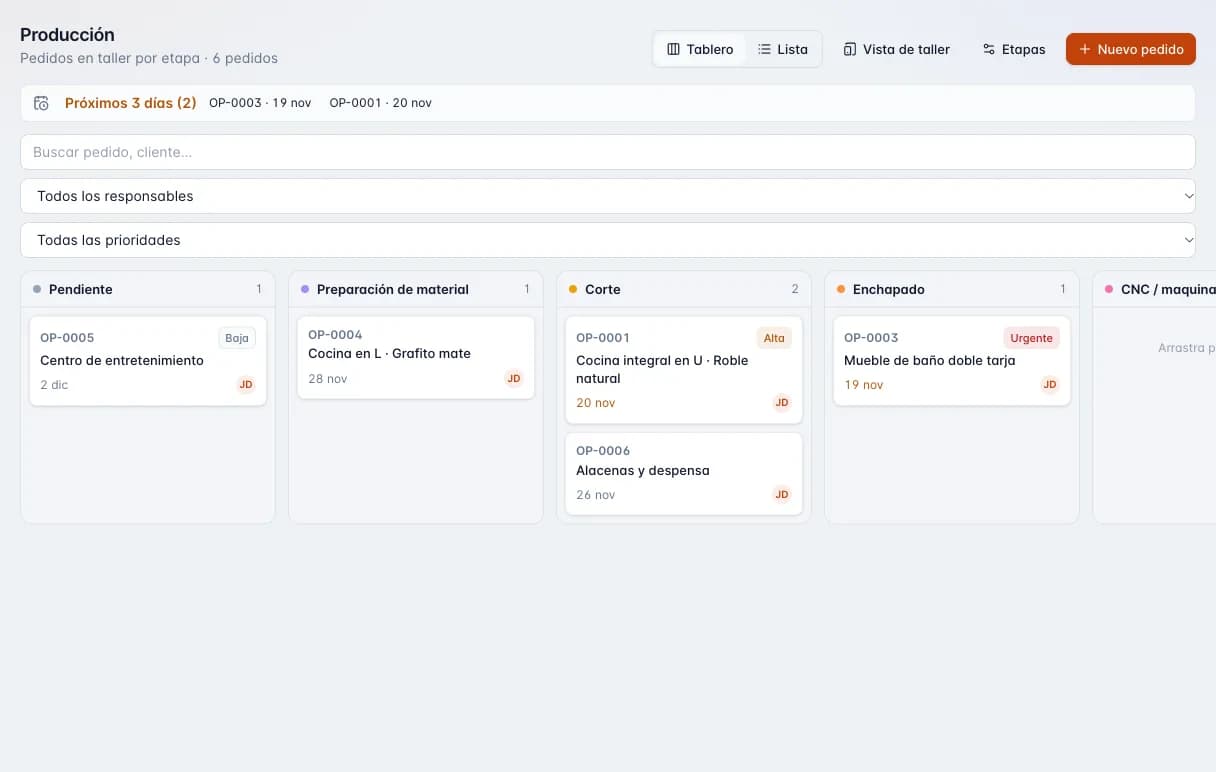
- 1Board or list view, shop-floor view and stages.
- 2Orders due in the next 3 days.
- 3Search and filters by owner and priority.
- 4One column per stage: pending, material prep, cutting, edge banding…
- 5Each order with its number, priority, due date and owner.
What happens when the schedule lives on a whiteboard
- Nobody knows where a job stands until the customer calls asking.
- Promised dates slip by before anyone notices.
- Notes, photos and drawings scattered across texts and notebooks.
- The shop floor keeps walking into the office to ask what is next.
- Your crew sees prices and costs they have no business seeing.
What the Production module does
- 10 stages out of the box
- Pending, material prep, cutting, edge banding, CNC machining, assembly, finishing, quality check, ready to install, and installed or delivered.
- Stages that fit your shop
- Adjust the stages so the board matches how your shop really runs.
- Kanban board
- Drag each job to its next stage, with a mouse or a finger on a tablet or phone.
- Shop-floor view
- Big touch targets to move a job or add a note right from the floor, no menus to fight.
- Workshop role
- Users with the workshop role land straight on the shop-floor view, ready to work.
- Overdue and due-soon flags
- Jobs past due and jobs due within 3 days are flagged so nothing slips.
- Priority
- Mark which jobs go first when the shop is slammed.
- Notes and timeline
- Each job keeps its notes and a timeline of every stage change.
- File attachments
- Attach drawings, photos or the cut-list PDF to the job, up to 15 MB per file.
- See-money permission
- Decide who sees costs and prices. The shop can build the job without seeing what you charged.
How it runs in the shop
- 01
The job comes in
From an accepted quote or created by hand, with its due date and priority.
- 02
Set your stages once
Use the 10 default stages or adapt them to your process.
- 03
The floor moves it
Each person advances the job from the shop-floor view and leaves notes or photos.
- 04
The office sees everything
The board shows late jobs, upcoming deliveries and each job's history.
- 05
Install and close
At the last stage the job is marked delivered, and with Inventory its reserved material is deducted.
Production module spec sheet
- Default stages
- 10, customizable
- Views
- Kanban board and touch-friendly shop-floor view
- Tracking level
- Per job (not per part)
- On-screen flags
- Overdue and due within 3 days
- Per job
- Priority, due date, notes, timeline, attachments
- Attachments
- Up to 15 MB per file
- Users included
- Production: 3. Professional Suite: 3
- Roles
- Owner, admin, member, viewer and workshop
- Money visibility
- Per-member permission to show or hide costs and prices
- Platform
- Web browser on computer, tablet or phone
How it connects to the other modules
Who it is for
- Cabinet and furniture manufacturers
- Many jobs in flight at once, with a saw operator, edge bander, assemblers and installers.
- Kitchen cabinet shops
- Track every job from cutting to install, with the promised date always in view.
- Growing shops
- For when the owner can no longer keep the whole schedule in their head.
Plan Production
$19 USD/mo
Also included in Professional Suite.
Free tools and guides
Frequently asked questions
Can I change the stages?
Yes. It ships with 10 default stages and you can adapt them to how your shop works.
Does it track individual parts?
No. Tracking is per job: you see which stage each whole job is in, not each part on its own.
Can my crew scan part labels or barcodes?
Not yet. Progress is recorded by moving the job to its next stage on the board or the shop-floor view.
How many people can use it?
The Production plan includes 3 users and the Professional Suite includes 3.
Does it work on a shop tablet or phone?
Yes. It runs in the browser, and the shop-floor view has big buttons made for fingers.
Will my employees see what I charge?
Only if you want them to. Each member has a see-money permission; without it they see no costs or prices.
Does it alert me when a job runs late?
The board flags overdue jobs and jobs due within 3 days. These are on-screen flags, not email notifications.
Does it connect to my quotes?
Yes. With Quote, an accepted quote moves into production without retyping. The Professional Suite includes both modules.
Does it work offline?
No. It needs an internet connection; there is no offline mode.
Cut better starting with your next job
Create an account and use the full Workshop plan for 14 days. No card; afterwards you drop to the Free plan, not a lockout.