Cabinet quoting software built on your real costs
- Price
- $19 USD/mo
- Users included
- 1
- Included in
- Workshop · Professional Suite
- Runs in
- Browser, nothing to install
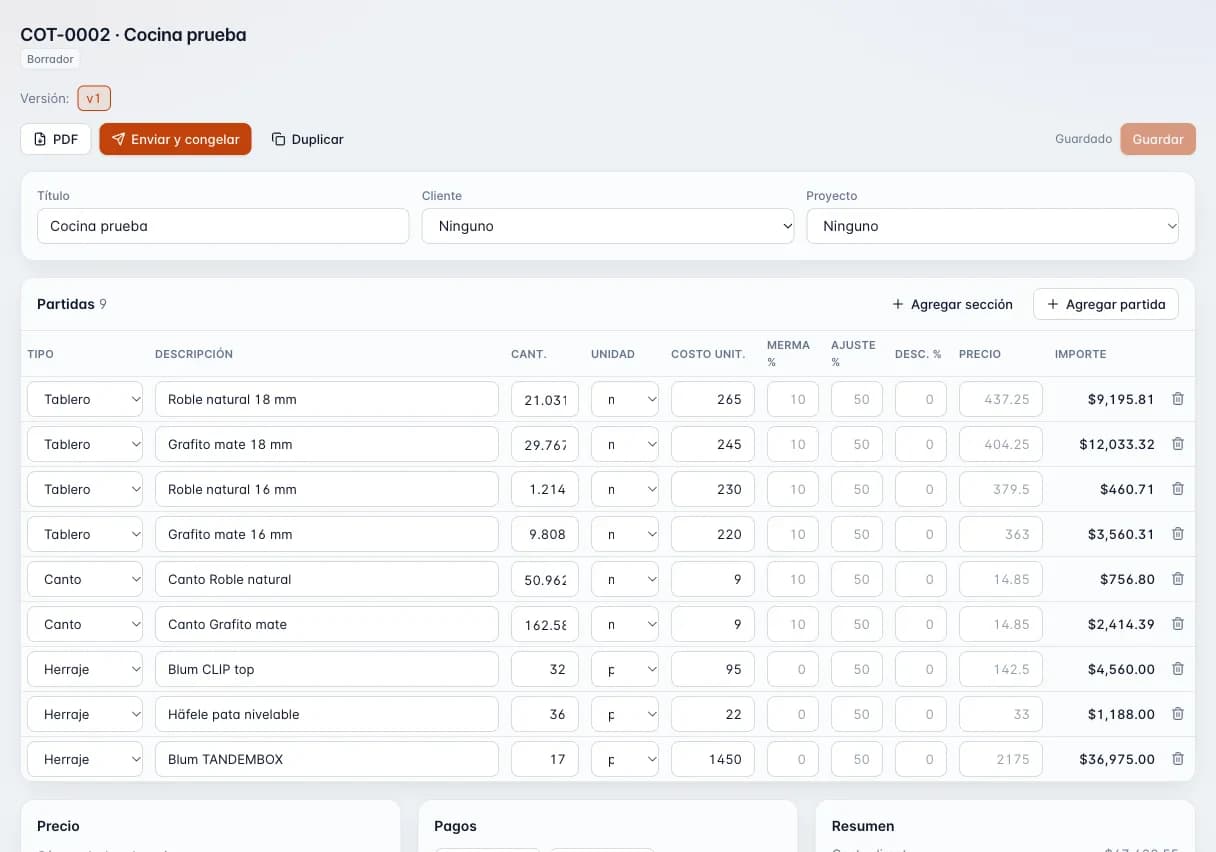
- 1Lines by type: board, edge banding and hardware, with quantity and unit.
- 2Cost, waste % and markup % per line: 265 × 1.10 × 1.50 = 437.25.
- 3Amount for each line.
- 4PDF, send and freeze the version, and duplicate.
Why so many cabinet shops underbid
- Per-linear-foot pricing that ignores how many sheets the job actually eats.
- Mixing up markup and margin and making less than you think.
- Spreadsheet quotes that take days to send and look homemade.
- The client asks for one more change and nobody knows which version they signed off on.
- Deposit, sales tax and delivery are figured separately by hand, and one of them gets missed.
What the Quote module does
- Line items by type
- Material, edge banding, hardware, labor, installation, delivery and other. Every line carries your cost and your price.
- Markup or margin
- Price with markup on cost or margin on selling price. Margin is capped at 99% so the math never breaks.
- Overhead, waste and discounts
- Add an overhead and waste percentage, and discount a single section or the whole quote.
- Deposit and payment milestones
- Set the deposit and later payments, such as one due at install, so the client knows what is due and when.
- Configurable taxes
- Keep a list of sales tax or VAT rates and apply the ones that fit each job.
- Multiple currencies
- Quote in US or Canadian dollars, euros, Mexican pesos and several Latin American currencies.
- Versions and statuses
- Sending a quote freezes it as a version. New version or duplicate when the client wants changes. Statuses: draft, sent, accepted, declined, expired and converted.
- Client approval link
- Every quote gets a public link where your client reviews it and accepts or declines. You share it however you like.
- Branded PDF and numbering
- A PDF with your logo and brand color, numbered in sequence (COT-0001) so nothing gets lost.
- Customers and projects
- Each quote is tied to a customer and a project, so you can find it fast.
How a kitchen quote comes together
- 01
Start from the cut list or a blank quote
If it comes from a design or a cutting job, the sheet and edge banding lines fill in for you. Otherwise, type them in.
- 02
Add hardware, labor and install
Hinges, slides, shop labor, installation and delivery.
- 03
Set your profit
Choose markup or margin, add overhead and waste, apply discounts and tax, and set the deposit.
- 04
Send it and get an answer
Download the PDF or share the link. The client accepts or declines from their phone and the status updates in your list.
- 05
Turn it into a job
With the Production module, the accepted quote becomes a production order without retyping anything.
Quote module spec sheet
- Line types
- Material, edge banding, hardware, labor, installation, delivery, other
- Profit method
- Markup on cost or margin on price (99% max)
- Adjustments
- Overhead, waste, per-section and whole-quote discounts
- Taxes
- Configurable list of sales tax or VAT rates
- Currencies
- USD, CAD, EUR, MXN, COP, CLP, PEN, ARS, GTQ
- Statuses
- Draft, sent, accepted, declined, expired (automatic after the valid-until date), converted
- Numbering
- Sequential, COT-0001 format
- Outputs
- PDF with logo and brand color, public client link
- Users included
- Quote: 1. Workshop: 2. Professional Suite: 3
- Roles
- Owner, admin, member, viewer and workshop, plus a permission that hides costs and prices
- Platform
- Web browser on computer, tablet or phone
How it connects to the other modules
Cabinet design
Hit Send to Quote and the design's parts, materials and hardware fill the quote.
Cutting optimizer
A cutting job fills in the sheet lines and the edge banding footage worked out by the optimizer.
Production
Once the client accepts, the quote converts into a production order on the shop board.
Inventory
Materials on the quote can be reserved in inventory for that job.
Who it is for
- Kitchen cabinet shops
- Long quotes with several sections, a deposit up front and the balance at install.
- Closet companies
- Clients who change their minds, handled with versions so the accepted one is never lost.
- One-person shops
- Price a job in minutes from your phone and send a PDF that looks professional.
- Cross-border work
- Quote in another currency without keeping a second price sheet.
Plan Quote
$19 USD/mo
Also included in Workshop and Professional Suite.
Frequently asked questions
What is the difference between markup and margin?
Markup is calculated on cost and margin on selling price. A 100% markup equals a 50% margin. The quote module lets you pick either, and our free calculator shows both.
Can I use it without the cabinet designer?
Yes. The Quote plan works on its own and you enter the lines yourself. Add Design or the Workshop plan later and quotes fill in from the design.
Does it email or text the quote for me?
Not yet. You download the PDF or copy the public link and send it yourself by email, text or whatever you use. The client accepts or declines from that link.
How does my client accept a quote?
They open the link on a phone or computer, review the quote and tap accept or decline. The status updates in your list.
What happens when the client asks for changes?
Sending a quote freezes it. You create a new version with the changes, so you always know which version they saw and which one they accepted.
Does it handle sales tax and deposits?
Yes. Keep a list of sales tax or VAT rates and apply them per quote. Deposits and later payments are set as payment milestones.
Which currencies can I quote in?
US and Canadian dollars, euros, Mexican pesos, and Colombian, Chilean, Peruvian, Argentine and Guatemalan currencies.
Do quotes carry my logo?
Yes. The PDF carries your logo and brand color, with sequential numbering (COT-0001).
Can I keep costs hidden from my crew?
Yes. Each member has a see-money permission. Turn it off and they will not see costs or prices.
Cut better starting with your next job
Create an account and use the full Workshop plan for 14 days. No card; afterwards you drop to the Free plan, not a lockout.