Cabinet design software for kitchens, closets and vanities
- Price
- $29 USD/mo
- Users included
- 1
- Included in
- Workshop · Professional Suite
- Runs in
- Browser, nothing to install
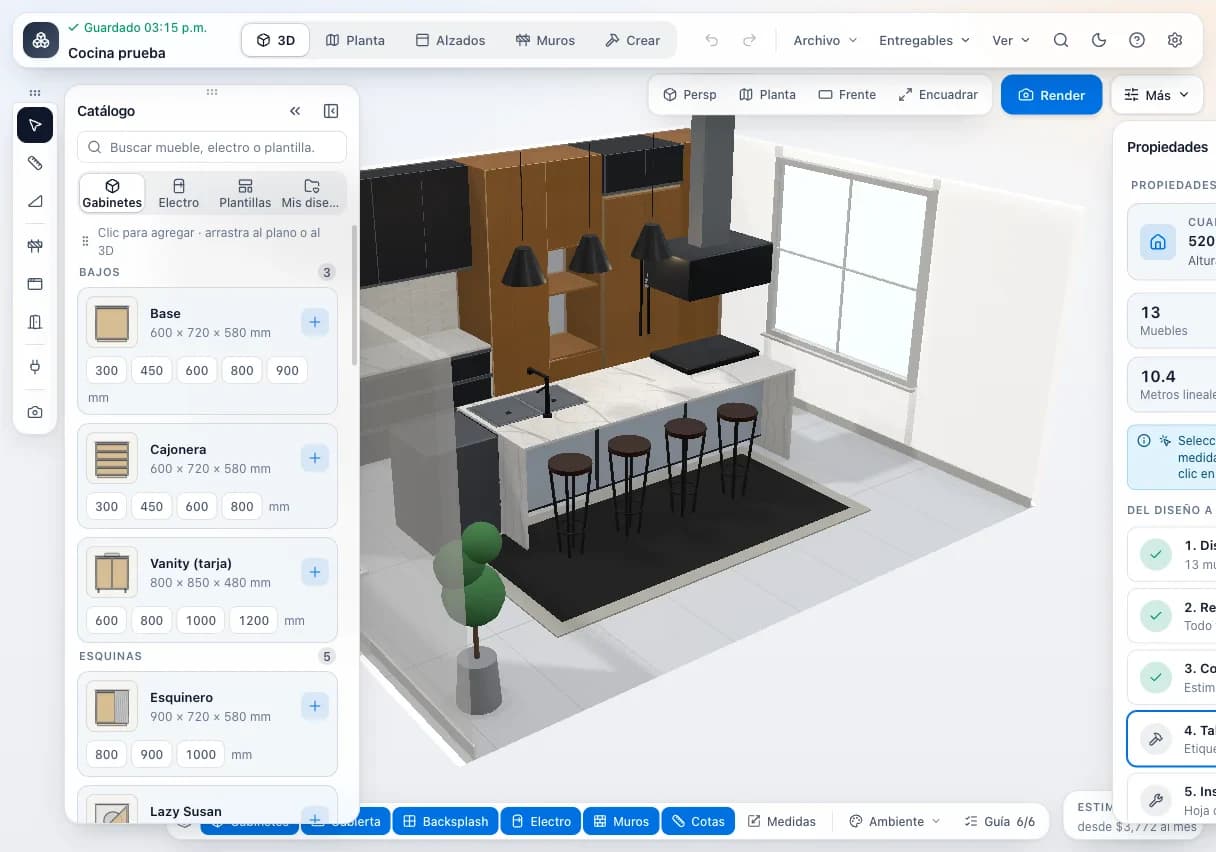
- 1Cabinet catalog (base, corner…) with sizes and standard widths, added with one click.
- 23D view of the project with cabinets, countertop and appliances.
- 3Switch between 3D, plan, elevations and walls.
- 4Project summary: 13 cabinets and 10.4 linear meters.
Where the hours (and money) go
- Drawing the job in one program, then retyping every part by hand to build a cut list.
- Dimension mistakes that show up after the part is already cut and banded.
- Clients who can't read a drawing and ask for changes on install day.
- Hinges and slides left off the order, holding up assembly.
- Desktop cabinet software that's expensive, Windows-only and tied to one machine.
What the Design module does
- Kitchens, closets and vanities
- Design kitchens, reach-in and walk-in closets and bathroom vanities in one editor, cabinet by cabinet, with editable dimensions.
- About 19 cabinet types
- Base, wall, drawer base, corner, tall, open, pantry, vanity, filler, closet unit, lazy Susan, pull-outs, lift-up, oven tower, magic corner and more.
- Automatic closet layouts
- The generator builds a closet run with its units automatically, which you then fine-tune.
- 3D and photorealistic renders
- Spin the job in 3D with your client and produce a path-traced photorealistic render to close the sale before you cut.
- Floor plan, elevations and shop drawings
- A floor plan, wall elevations, and technical and assembly drawings for every cabinet, so the shop isn't guessing.
- Automatic cut list
- Every cabinet generates its parts with size, material and banding, with edge banding grouped by color.
- Hardware and shopping list
- A Blum hardware list, a shopping list, edge banding by color and a countertop quote.
- Exports
- Cut list to Excel (.xlsx) and CSV; CSV for hardware, cabinets, packing list, drilling plan and production order; DXF for the drilling plan and floor plan.
- Print from the browser
- Client proposal, part labels and cut sheet, printed straight from the browser.
- Materials catalog and shop settings
- A company catalog of sheet goods, edge banding, hardware and suppliers, with CSV import. Shop settings are shared across your team.
From bare wall to cut list in four steps
- 01
Start the job
Open a kitchen, closet or bathroom job with the room dimensions.
- 02
Place the cabinets
Pick a cabinet type, set its sizes, or let the generator build the closet run.
- 03
Review with your client
Show the 3D view or a photorealistic render and print the proposal.
- 04
Send it to cut and quote
Send to Cut and Send to Quote move the cut list, banding and hardware into the other modules for you.
Specs
- Job types
- Kitchens, closets and walk-ins, bathroom vanities
- Cabinet types
- About 19, from base and wall cabinets to oven towers, lazy Susans and magic corners
- Views
- Interactive 3D, photorealistic render, floor plan, elevations, technical and assembly drawings per cabinet
- Cut list
- Automatic per cabinet, with material and banding
- Hardware
- Blum hardware list, shopping list, edge banding by color, countertop quote
- Export
- Excel (.xlsx) and CSV cut list; CSV for hardware, cabinets, packing, drilling and production order; DXF drilling plan and floor plan
- Client proposal, labels and cut sheet from the browser
- Catalog
- Sheet goods, edge banding, hardware and more, with suppliers and CSV import
- Connections
- Send to Cut and Send to Quote
- Editor language
- Spanish for now; the rest of the app is in English and Spanish
- Users
- 1 on the Design plan, 2 on the Workshop plan
- Platform
- Browser (Chrome, Edge, Safari, Firefox) on a computer, tablet or phone
How it connects to the rest of the shop
Cutting optimizer
Send to Cut moves the cut list, with sizes, material and banding, into the optimizer with no retyping.
Quoting
Send to Quote fills the quote with the job's material, banding and hardware; you add labor, install and your margin.
Production
When the client accepts the quote it becomes a production order the shop moves through its stages.
Inventory
The order can reserve sheet goods, banding and hardware in inventory, consumed when the order is done.
Who it's for
- Kitchen cabinet makers
- Base, wall, tall and corner cabinets with shop drawings and a hardware list on every job.
- Closet and walk-in builders
- The generator lays out the closet run automatically; you adjust the units.
- Bathroom vanity makers
- Vanity cabinets with the same cut list, banding and drawings as a kitchen.
- Shop salespeople and designers
- Show the client a 3D view and render, then hand the shop a job it can cut as drawn.
Plan Design
$29 USD/mo
Also included in Workshop and Professional Suite.
Frequently asked questions
What can I design with it?
Kitchens, closets, walk-ins and bathroom vanities in melamine or MDF, built cabinet by cabinet from about 19 cabinet types.
Is the cutting optimizer included?
Yes. The Design plan includes Cut's optimization and saved projects with no parts limit, so every design can be cut. Offcuts, QR labels and CNC files come with the Cut, Workshop and Professional Suite plans.
Can I quote straight from the design?
Yes, on the Workshop plan or the Professional Suite, which include Quote. Send to Quote fills the quote with the job's material, banding and hardware.
Is the designer in English?
Not yet. The designer screen is in Spanish for now. The rest of the app, including Cut and Quote, is available in English and Spanish.
Does it produce shop drawings?
Yes. A floor plan, elevations, and technical and assembly drawings per cabinet, plus DXF export of the drilling plan and floor plan.
Can I export the cut list to Excel?
Yes. The cut list exports to Excel (.xlsx) and CSV, and there are CSV exports for hardware, cabinets, packing list, drilling plan and production order.
Does it build a hardware list?
Yes. It builds a Blum hardware list, a shopping list and edge banding by color.
Does it run on a Mac or an iPad?
Yes. It runs in Chrome, Edge, Safari or Firefox, so it works on Windows, Mac, tablets and phones. Nothing to install, though you need an internet connection.
Can I use my own materials?
Yes. Your company has its own catalog of sheet goods, edge banding, hardware and suppliers, and you can import it from CSV.
Cut better starting with your next job
Create an account and use the full Workshop plan for 14 days. No card; afterwards you drop to the Free plan, not a lockout.